Your Profile
Your public badge profile displays the badges you've chosen to accept. Anyone can view it.
Viewing Your Profile
After logging in, click your profile picture in the navigation and select View Profile.
Your profile shows:
- Your Nostr display name and picture
- All badges you've accepted
- Badge details (issuer, description)
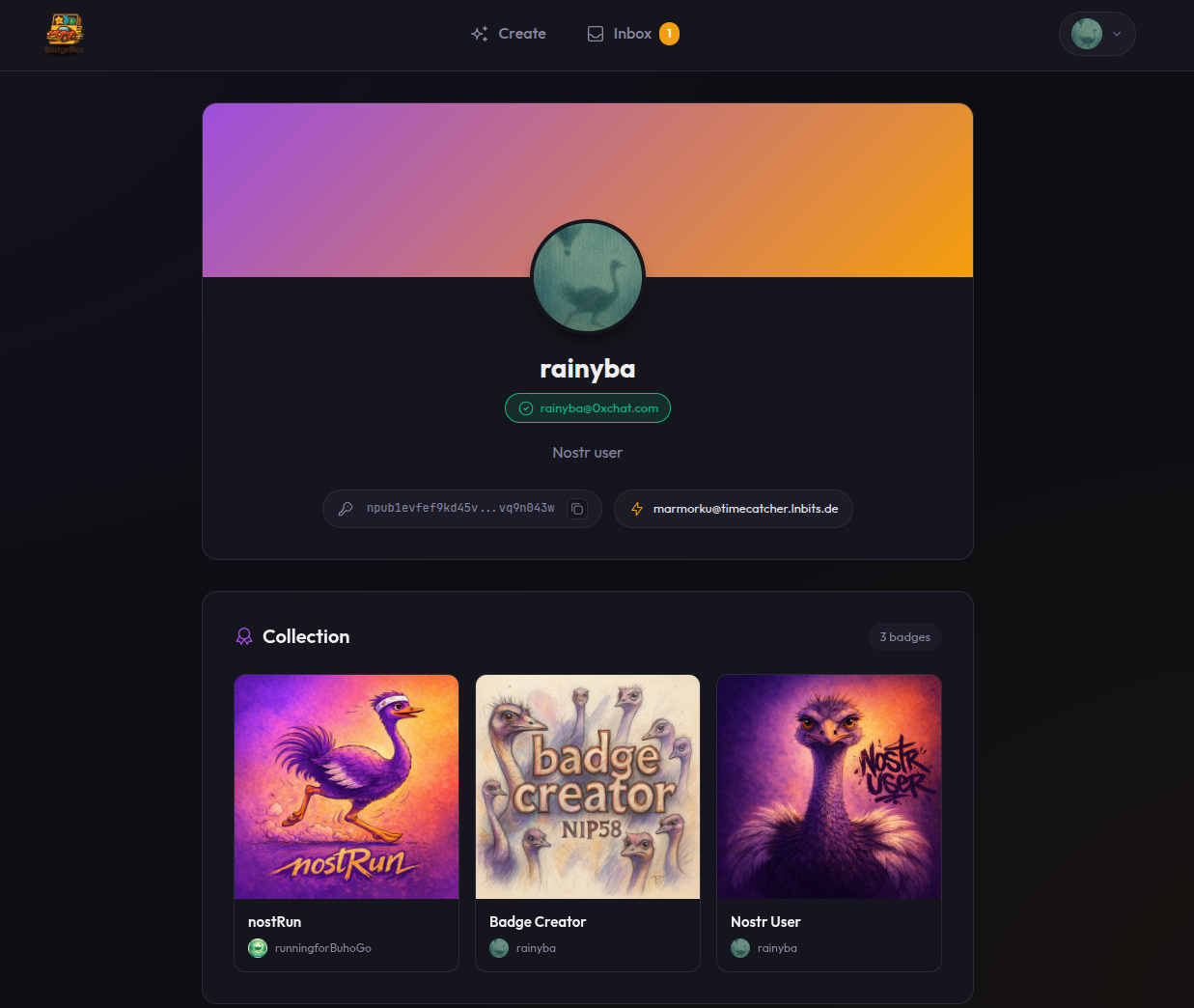
Your public badge profile
What Others See
Anyone can view your badge profile by visiting:
/profile/[your-public-key]They'll see:
- Your public Nostr metadata
- Your accepted badges with verification
- Who issued each badge
Visitors can verify your badges are legitimate. The cryptographic signatures prove:
- The badge was created by the issuer
- The issuer awarded it to you
- You accepted it
Viewing Other Profiles
Check anyone's badges by entering their public key:
Get Their Public Key
Ask for their npub or find it on another Nostr client.
Navigate to Profile
Go to /profile/[their-npub-or-hex]
View Badges
See the badges they earned and accepted.
Profile Data
Your profile information (name, picture, bio) comes from your Nostr kind 0 metadata event. Badge Box reads this from relays — it doesn't store it separately.
To update your profile info, use any Nostr client that supports profile editing.